Hiding Data in Plain Sight
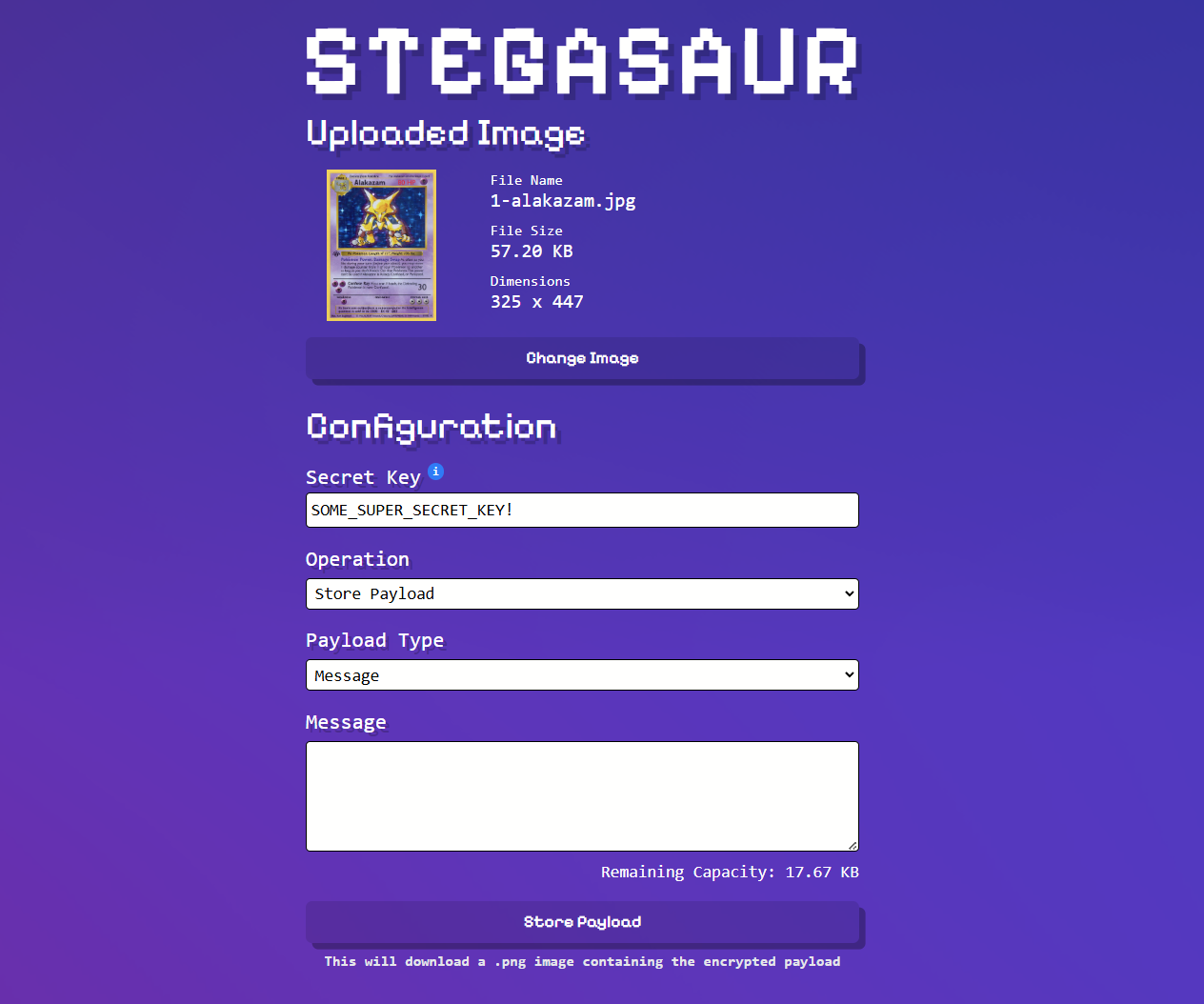
Have you ever wanted to hide a secret message or file inside an image? That's exactly what steganography allows us to do. Unlike encryption which makes data unreadable, steganography hides the very existence of the data itself. Recently, I built Stegasaur, a web-based tool that combines both steganography and encryption to securely hide files within images.
The journey of building Stegasaur taught me a lot about how images store data, how to manipulate binary information, and how to implement robust encryption in the browser. In this post, I'll walk through the key concepts and implementation details.
What is Steganography?
Steganography is the practice of concealing information within other non-secret data. The word itself comes from Greek: "steganos" (covered) and "graphein" (writing). Unlike cryptography which scrambles data to make it unreadable, steganography hides data so that observers don't even know secret information exists.
In digital steganography, we can hide data in various media files such as images, audio, video, or even text. For Stegasaur, I focused on images because they're ubiquitous and offer plenty of space to hide data without noticeable visual changes.
The key insight is that image files contain far more data than our eyes can perceive. By making tiny, imperceptible changes to pixel values, we can embed our own data without anyone noticing.
The Alpha Channel Approach
Most image formats store pixel data using multiple channels. PNG images, which Stegasaur uses, typically have four channels per pixel: Red, Green, Blue, and Alpha (RGBA). The alpha channel controls transparency, where 255 is fully opaque and 0 is fully transparent.
Here's where it gets interesting: for images with solid colors or no transparency, the alpha channel is typically maxed out at 255 for every pixel. That means we can make small changes to those alpha values without affecting how the image looks.
I chose to use the least significant bit (LSB) of each alpha channel byte. In binary, the number 255 looks like 11111111, and 254 looks like 11111110. The difference between these two values is invisible to the human eye, but it gives us one bit of storage per pixel.
Here's a simplified example of how the encoding works:
// Store a single bit in the alpha channel's LSB
function encodeBit(alphaValue, bit) {
  // Clear the LSB using bitwise AND with 0xFE (11111110)
  // Then set it to our bit value using bitwise OR
  return (alphaValue & 0xfe) | bit;
}
Encryption First
Before hiding anything, we need to encrypt it. Security through obscurity alone isn't enough. If someone suspects steganography and extracts the hidden bits, the data should still be unreadable without the secret key.
Stegasaur uses the Web Crypto API with AES-CBC (Advanced Encryption Standard in Cipher Block Chaining mode) for encryption. Here's what happens:
-
Key Derivation: The user's password is converted into a cryptographic key using PBKDF2 (Password-Based Key Derivation Function 2) with 300,000 iterations. This makes brute-force attacks much harder.
-
Random Salt and IV: A random 16-byte salt is used for key derivation, and a random 16-byte initialization vector (IV) is used for encryption. These ensure that encrypting the same data twice produces different results.
-
AES-CBC Encryption: The payload is encrypted using the derived key and IV.
Here's the core encryption function:
async function encryptWithSubtleCrypto(payload, key, initVector) {
  const encryptedPayload = await window.crypto.subtle.encrypt(
    { name: "AES-CBC", iv: initVector },
    key,
    typeof payload === "string"
      ? textEncoder.encode(payload)
      : new Uint8ClampedArray(payload)
  );
  return encryptedPayload;
}
The Header Structure
To successfully retrieve and decrypt data later, we need to store metadata alongside the encrypted payload. Stegasaur uses a header structure that contains:
- Payload Length (4 bytes): How many encrypted bytes follow the header
- Initialization Vector (16 bytes): Required for AES-CBC decryption
- Salt (16 bytes): Required to regenerate the encryption key
- Payload Type (1 byte): Whether it's a text message or a file
- File Extension (8 bytes): If it's a file, what extension it has
This header totals 45 bytes (360 bits), which means we need at least 360 pixels to store just the metadata, before even considering the payload itself.
The header is prepended to the encrypted data, and the whole thing is encoded into the image's alpha channels:
function generatePayloadHeader(
  encryptedPayLoadByteLength,
  iv,
  keySalt,
  payloadType,
  payloadFileExt
) {
  const lengthHeaderBytes = [
    (encryptedPayLoadByteLength >> 24) & 0xff,
    (encryptedPayLoadByteLength >> 16) & 0xff,
    (encryptedPayLoadByteLength >> 8) & 0xff,
    encryptedPayLoadByteLength & 0xff,
  ];

  const payloadTypeByte = [payloadType === "file" ? 1 : 0];

  // Combine all header components
  return new Uint8ClampedArray(
    lengthHeaderBytes.concat(
      Array.from(iv),
      Array.from(keySalt),
      payloadTypeByte,
      Array.from(payloadFileExtBytes)
    )
  );
}
Encoding the Data
Once we have our encrypted data with its header, we need to encode it into the image. The process is straightforward but requires careful bit manipulation:
- Convert the encrypted data into individual bits
- For each bit, find the corresponding alpha channel byte
- Clear the LSB of that byte and set it to our data bit
- Fill remaining alpha channels with random data to avoid patterns
Here's the encoding function:
export function encodePayloadInAlpha(pixelBytes, payload) {
  const bits = uint8ArrayToBits(payload);

  // Encode payload into LSB of each alpha byte
  for (let i = 0; i < bits.length; i++) {
    const alphaIndex = i * 4 + 3; // Every 4th byte is alpha
    if (alphaIndex >= pixelBytes.length) break;

    // Clear LSB and set to our bit
    pixelBytes[alphaIndex] = (pixelBytes[alphaIndex] & 0xfe) | bits[i];
  }

  // Fill remaining alpha channels with random bits
  const fillerBytes = getLargeRandomValues(
    pixelBytes.length - bits.length / 8
  );
  const fillerBits = uint8ArrayToBits(fillerBytes);

  for (let i = bits.length; i < fillerBits.length; i++) {
    const alphaIndex = i * 4 + 3;
    if (alphaIndex >= pixelBytes.length) break;
    pixelBytes[alphaIndex] =
      (pixelBytes[alphaIndex] & 0xfe) | fillerBits[i - bits.length];
  }

  return pixelBytes;
}
The random filler data is important - it ensures that unused alpha channels don't all have the same LSB value, which would create a detectable pattern.
Decoding and Decryption
The retrieval process reverses everything:
- Extract LSB bits from all alpha channels in the image
- Read the header (first 360 bits) to get metadata
- Extract the encrypted payload using the length from the header
- Derive the key using the password and salt from the header
- Decrypt the payload using the key and IV from the header
- Return the original data (either as text or as a binary file)
export async function decodeDataFromImage(pixels) {
  const imageAlphaBits = [];

  // Extract LSB from all alpha channels
  for (let i = 0; i < Math.floor(pixels.length / 4); i++) {
    const alphaIndex = i * 4 + 3;
    imageAlphaBits.push(pixels[alphaIndex] & 1);
  }

  // Parse header to get metadata
  const headerBits = imageAlphaBits.slice(0, TOTAL_HEADER_BIT_LENGTH);
  const payloadLength = convertBitsToDecimal(
    headerBits.slice(0, 32)
  );
  const iv = convertBitsToByteArr(
    headerBits.slice(32, 160)
  );
  const salt = convertBitsToByteArr(
    headerBits.slice(160, 288)
  );

  // Extract encrypted payload bytes
  const bytes = [];
  for (
    let i = TOTAL_HEADER_BIT_LENGTH;
    i < TOTAL_HEADER_BIT_LENGTH + payloadLength * 8;
    i += 8
  ) {
    const byteBits = imageAlphaBits.slice(i, i + 8);
    const byte = byteBits.reduce((acc, bit) => (acc << 1) | bit, 0);
    bytes.push(byte);
  }

  return { bytes, iv, salt, payloadType, payloadFileExt };
}
Capacity and Limitations
The capacity of an image depends on its dimensions. With one bit per pixel:
- A 1000×1000 pixel image can store 1,000,000 bits = 125,000 bytes ≈ 122 KB
- A 2000×2000 pixel image can store 4,000,000 bits = 500,000 bytes ≈ 488 KB
This is plenty for text messages and many document types, though large files like videos won't fit. Stegasaur calculates and displays the available capacity in real-time as users upload images.
One important limitation: Stegasaur currently only works with PNG files. JPEGs use lossy compression that would destroy the hidden bits. Converting a JPEG to PNG and back to JPEG would also lose the data.
Client-Side Processing
One of my favorite aspects of Stegasaur is that everything happens in the browser. No data is ever sent to a server. This has several advantages:
- Privacy: Your secret messages never leave your device
- Speed: No network round trips needed
- Simplicity: No backend infrastructure to maintain
- Cost: Free to run and host as a static site
Modern browser APIs like the Web Crypto API and Canvas API make this entirely possible. The Canvas API lets us read and write pixel data directly:
const canvas = document.createElement('canvas');
const ctx = canvas.getContext('2d');
ctx.drawImage(image, 0, 0);
const imageData = ctx.getImageData(0, 0, canvas.width, canvas.height);
// imageData.data is a Uint8ClampedArray of RGBA values
Lessons Learned
Building Stegasaur taught me several valuable lessons:
Binary operations are powerful: Working with bits and bytes directly opens up a whole world of possibilities. Understanding bitwise operations (&, |, >>, <<) is essential for low-level data manipulation.
Security requires layers: Combining steganography with strong encryption provides defense in depth. Neither is perfect alone, but together they're much stronger.
Browser APIs are underrated: The Web Crypto API provides genuine cryptographic security, and the Canvas API gives low-level access to image data. We can build surprisingly powerful tools with just client-side JavaScript.
Performance matters: Converting large images to and from binary data can be slow. I had to be careful about generating large amounts of random data efficiently, which led to implementing chunked random value generation for the Web Crypto API's limits.
Wrapping Up
Steganography is a fascinating field that combines cryptography, image processing, and creative problem-solving. Stegasaur demonstrates that you don't need complicated server infrastructure or low-level languages to implement these concepts.
The project is open source and available on GitHub. Whether you want to hide secret messages in memes or just learn about steganography, I hope Stegasaur serves as a useful tool and learning resource.
Remember: use steganography responsibly and for legitimate purposes only. With great power comes great responsibility!