
Styling React Applications
When it comes to styling your React application, there are many different ways to do so. To keep this simply I am going to break it down into 3 methods that have been adopted widely by the React community.
- Traditional CSS Modules
- CSS-in-JS
- Utility-first frameworks
Traditional CSS modules
This is probably the most common method used as it is most obvious way to style your React application. Most people today also use a CSS preprocessor such as SASS to make writing their stylesheets easier.
Any time we want to create styles for something we go to a corrsponding stylesheet file to do so. With all these extra files, you will likely want to come up with a way to organize everything. Below is an example of a projects SCSS file architecture:
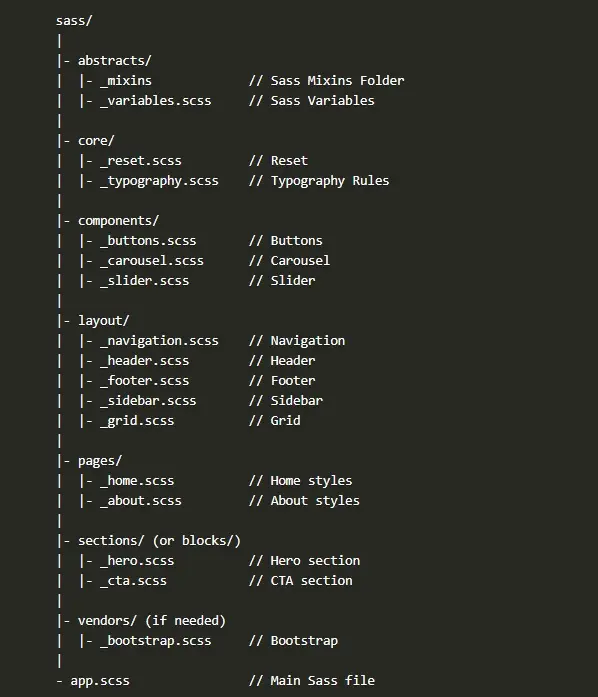
Adopting an architecture like this one allows you to manage styles easily as the size of you application continues to grow.
But for those out there that don't exactly like having to write styles in separate files have in recent times adopted what is known as CSS-in-JS.
CSS-in-JS
CSS-in-JS is exactly what it sounds like - you will be writing all of your styles in JS files. This allows you to use JS logic to create dynamic styles much easier. This method by itself has a few different ways to approach the situation.
The two most popular being:
- Inline styling
- Styled components
Inline styling is a simple approach where we just write our styles as JS objects and take advantage of JSX by placing these objects in the style attribute of our elements.
const styles = {
  Headers: {
    h1: {
      color: "#111",
      fontSize: "48px"
    },
    h2: {
      color: "#222",
      fontSize: "36px"
    }
  }
}

function App() {
 return (
   <>
      <h1 style={styles.Headers.h1}>H1 Header</h1>
      <h2 style={styles.Header.h2}>H2 Header</h2>
    </>
 );
Now typically you would be creating files dedicated to housing styles in and import them as needed. The great thing about this is since we are in JS we can do all sorts of dynamic styling. We could call a function with some props and have this function return back the proper set of styles for the scenario provided. But the bad thing about this method is some things just aren't possible such as media queries and psuedo-selectors
However the next approach solves the issue of not being able to write media queries and psuedo-selectors.
With styled components, we write true CSS in our JS. How can this be done you ask? Well the easiest way is to install styled-components: npm install --save styled-components (there's also another popular choice called emotion that is very similar and loved by many)
Now that we have the package installed, just import it where you would like to use it and prepare to have your mind blown. So if we re-create our previous example for the h1 and h2 elements it would look something like:
const H1 = styled.h1`
  color: "#111",
  fontSize: "48px"
`;
const H2 = styled.h2`
  color: "#222",
  fontSize: "36px"
`;

function App() {
 return (
   <>
      <H1></H1>
      <H2></H2>
    </>
 );
Pretty awesome huh? And the really cool thing is that we can do media-queries, psuedo-selectors, and even nesting
Check out the following documentation if you want to learn more about this package!
Utility first frameworks
Utility first frameworks have been getting a lot of attention recently, mainly due to tailwindcss. They hand you well-defined design system in which you can use as is or customize to your liking.
These frameworks generate a plethora of classes for you to use on your elements. One down side that some people see in this approach is that your templates will in many cases have lots of classes on elements.
Take a look at this example from the tailwindcss homepage (take notice of the md: classes):
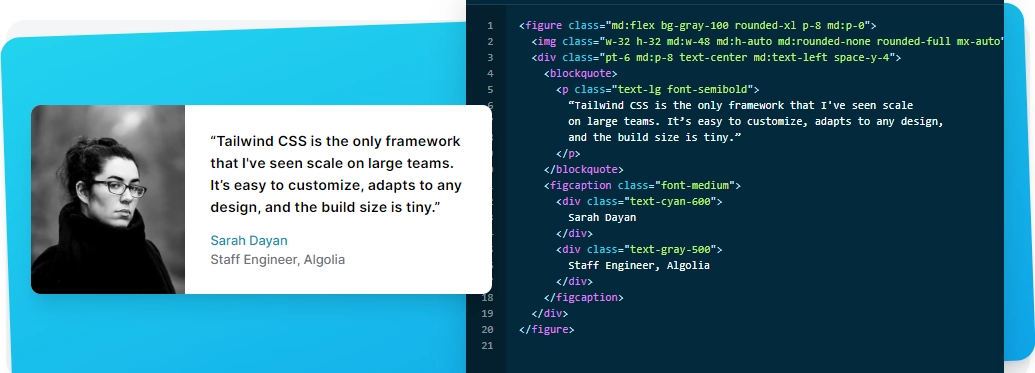
This is in my opinion actually not a bad thing, in fact I think the benefits greatly out weigh the downsides. It allows developers to focus on the template and understand exactly what styles are being applied rather than seeing what classes are used and then having to reference stylesheets to find out what styles are being applied.
It also creates classes specifically for when we want to use media queries or different element states.
<button class="bg-blue-800 text-white p-4 lg:p-8 hover:bg-blue-600"></button>This changes background color on hover and applys more padding when the screen matches the lg media query break point (default: 1024px - but once again, this is all customizable!)
Here are some of the other benefits you get with a utlity-first framework:
- Helps avoids specificty issues.
- Avoid re-writing styles or overriding styles for certain situations.
- Very clear which styles are applied to what elements.
- Rapid development and prototyping.
And even if you are using one of these utility-first frameworks you can still create base styles so you don't re-write the same buttons classes on every button (that would be incredibly annoying).
h1 {
  @apply text-5xl md:text-6xl mb-6 leading-tight;
}
This is applying the classes above to any h1 element in our application. So we are still free to create our own styles and create re-usable base styles very easily.
All in all, I must say that tailwindcss has done a fantastic job at building exactly what a utility-first framework should be. There is a lot to cover, which I plan to do so in a future post.
Wrapping it all up
Overall my favorite approach currently is using a utility-first framework like tailwindcss. It just brings about a very enjoyable and non-intrusive developer experience. But before this, I was almost exclusively using styled-components which absolutely still have a great use and would be my choice if I wanted to do any sort of dynamic styling by utilizing javascript.
I hope I have been able to share something new with you or have inspired you to try out a new approach to styling your next application!